
Unknown Sources Android is a term you may see when trying to install an APK on your phone.
The wording can be confusing, especially because newer versions of Android handle this permission differently from older versions.
In simple terms, Android uses this setting to control whether an app, such as Chrome or a file manager, is allowed to install applications that did not come through Google Play.
But “unknown” does not automatically mean “dangerous.” It mainly describes where the application is coming from. You should still check the APK before installing it, because apps from outside the usual app store can carry additional security risks.
Let’s look at what the setting means and how it works.
Unknown Sources on Android: What Does It Mean?
An unknown sources Android generally means a source other than the normal Google Play distribution channel.
For example, suppose you download an APK through Chrome from a website. When you try to install that APK, Android may ask you to allow Chrome to install unknown apps.
This permission exists because Android wants to prevent applications from being installed silently without your knowledge.
It gives you more control over which apps are allowed to start an installation.
Why Does Android Block Unknown Sources?
Google Play provides a controlled way of discovering and installing Android applications.
When you download an APK directly from another website, Android cannot treat that source in exactly the same way as an application distributed through Google Play.
Instead of allowing every application to install APKs freely, Android can require you to explicitly give permission to the source.
This provides an additional security barrier against unwanted installations.
It does not mean every APK outside Google Play is malicious. It means Android wants you to make a conscious decision before allowing that type of installation.
“Unknown Sources Android” vs “Install Unknown Apps Android”
This is where many older Android guides become confusing.
On older Android versions, users commonly saw a setting called:
Unknown Sources Android
It could be enabled to allow applications from outside Google Play to be installed.
On newer Android versions, the system uses a more specific permission called:
Install unknown apps
Instead of giving every application permission to install APKs, Android can allow a particular source to do it.
For example, you might allow:
Chrome → Install unknown apps
while another application remains blocked from installing apps.
This more specific approach gives users greater control over APK installations.
How to Allow an App to Install an APK
The exact menu can vary depending on your phone manufacturer and Android version.
A common path on newer Android devices is:
Settings → Apps → Special app access → Install unknown apps
You may then see a list of applications that can potentially install APK files.
Choose the application you are using, such as Chrome or your file manager, and look for the option allowing it to install unknown apps.
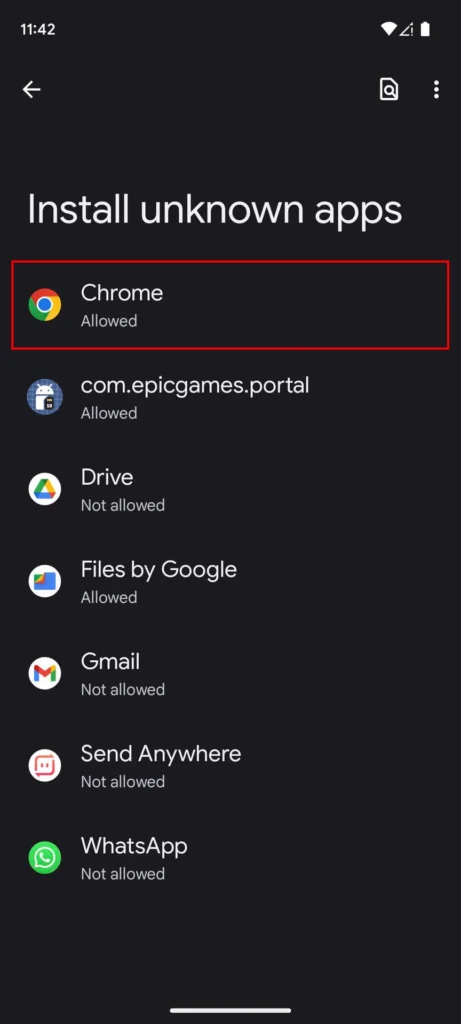
You can then return to your APK and try the installation again.
Once the permission is enabled, you can follow our step-by-step guide on how to install APK files on Android.
Do You Need to Enable Unknown Sources for Every APK?
Not necessarily.
On newer Android versions, the permission is generally connected to the source application, rather than being a universal switch for every APK.
For example, if you downloaded an APK through Chrome, Chrome may need the permission.
If you later open an APK through a different file manager, that application may have its own permission.
This is one reason older tutorials that simply tell users to “turn on Unknown Sources” may not match what they see on a newer Android phone.
Is Installing From an Unknown Source Safe?
The word unknown should not be interpreted as a statement that the APK is definitely unsafe.
However, installing applications from outside Google Play does require more attention from the user.
The main question is:
Do you trust the source and the application?
Before installing an APK, consider checking:
- Where the APK came from
- Who developed the application
- Whether the version appears genuine
- What permissions the app requests
- Whether the APK has been modified
- Whether Android or Play Protect displays a warning
A website’s appearance alone is not enough to establish that an APK is safe.
For a complete checklist, see our guide on How to Check Whether an APK Is Safe Before Installing.
Should You Enable Install Unknown Apps?
There isn’t a need to leave this permission enabled for every application all the time.
If you are installing an APK from a source you have chosen to use, you can allow the relevant application to install it and then review the permission afterward.
For example, if Chrome was temporarily allowed to install an APK, you can return to the same setting and disable the permission when you no longer need it.
The important thing is to understand which application has the permission rather than simply enabling it and forgetting about it.
What If Android Shows a Security Warning?
The installation permission and security warnings are two different things.
Allowing Chrome or another application to install an APK does not mean Android has confirmed that the APK is safe.
Android and Google Play Protect can still perform security checks and may warn you about potentially harmful applications.
If you receive a warning, don’t assume that granting the installation permission will make the warning disappear for a good reason.
Instead, investigate the APK and its source.
You can learn more in our guide on Google Play Protect and APK Safety.
Why Does Android Say “For Your Security”?
You may see a message explaining that your phone is blocking an installation for security reasons.
This generally means Android is preventing an application from being installed through a source that has not been given the required permission.
The message is there to make you aware that the installation is coming from outside the normal app-distribution process.
Read the message carefully rather than immediately searching for a way to bypass it.
Can You Turn the Permission Off Again?
Yes.
If you no longer want a particular application to install APK files, you can return to its Install unknown apps setting and disable the permission.
For example:
Settings → Apps → Special app access → Install unknown apps → Chrome → Turn off permission
The exact steps may be different on your phone.
Turning the permission off does not uninstall applications you have already installed. It simply prevents that particular source from starting future installations until you allow it again.
What If an APK Still Won’t Install?
Allowing the source to install unknown apps does not solve every APK installation problem.
If the APK still refuses to install, there could be another reason.
The file might be:
- Damaged or incomplete
- Incompatible with your Android version
- Designed for a different device architecture
- Conflicting with an existing version
- Low on required storage
- Blocked because of a security concern
For those situations, see our guide on How to Fix APK Installation Problems on Android.
Frequently Asked Questions
Does “Unknown Sources” mean the APK is a virus?
No. The term refers to an app being installed from outside the standard trusted distribution source. It does not automatically mean the APK contains malware.
Is “Install Unknown Apps” the same as “Unknown Sources”?
They refer to the same general concept, but newer Android versions use a more specific, per-app Install unknown apps permission.
Why can’t I find the Unknown Sources setting?
If you’re using a newer Android version, you may not see an option literally called “Unknown Sources.” Look for Install unknown apps under your device’s special app access settings.
Can I install an APK without enabling the permission?
If Android requires the permission for that particular source, you normally need to allow it before that application can start the installation.
Should I leave Install Unknown Apps enabled?
You can disable the permission for a source when you no longer need it. The exact choice depends on how you use APK files, but you should know which applications have installation permission.
Final Thoughts
Unknown Sources is mainly an Android security control that helps determine which applications are allowed to install apps from outside Google Play.
Older Android versions commonly used a general Unknown Sources setting, while newer versions use the more specific Install unknown apps permission for individual sources such as browsers and file managers.
Allowing that permission does not mean an APK is automatically safe. You should still check its source, developer, permissions, and any security warnings before installing it.
If Android blocks an APK, don’t assume that turning off security is the answer. Understanding why the installation is being blocked is a much better starting point.