
If you install apps on Android, you may have seen Google Play Protect mentioned during an installation or noticed a security warning before opening an app.
Play Protect is Google’s built-in security system for Android. It checks applications for potentially harmful behavior and can warn users when it detects something that may put their device or personal information at risk.
This is especially relevant when installing an APK from outside Google Play. But what exactly does Play Protect do, and should you trust every APK simply because Play Protect does not show a warning?
Let’s look at how it works and what Android users should know.
If you are looking for the actual installation process, see our guide on How to Install APK Files on Android.
What Is Google Play Protect?
Google Play Protect is a security feature built into Android devices with Google Play services.
It helps protect users from potentially harmful applications by checking apps and looking for behavior associated with malware or other unwanted software.
One useful part of Play Protect is that it is not limited to apps downloaded directly from Google Play. Android can also check applications installed from other sources.
This makes it particularly relevant when you manually install APK files.
Does Google Play Protect Scan APK Files?
Yes. Play Protect can check applications installed from outside Google Play as well as applications obtained through Google Play Protect.
When you install an APK, Android may perform a security check and can display a warning if the application is identified as potentially harmful.
Play Protect can also continue checking applications after they have been installed.
This means its job is not simply to look at an APK once during installation. It provides ongoing protection as part of Android’s security system.
How Does Play Protect Check Apps?
Play Protect uses Google’s application security systems to identify potentially harmful applications.
It can look for known threats and suspicious application behavior. Google also uses information from its broader Android security systems to improve detection.
In practical terms, this means you don’t have to manually inspect every technical part of an APK to receive some basic protection from Android.
However, security detection is not the same thing as a guarantee.
A lack of a warning does not mean that an APK has been proven completely safe.
What Happens If Play Protect Finds a Problem?
If Play Protect detects an application that may be harmful, Android can display a warning.
Depending on the situation, Play Protect may also prevent an application from being installed, disable a harmful application, or remove it from the device.
The exact message can vary depending on the type of threat and the Android version.
If you receive a Play Protect warning, it is better to stop and investigate rather than immediately trying to bypass the warning.
How to Check if Play Protect Is Enabled
On many Android phones, you can check Play Protect through the Google Play Store.
A typical path is:
Google Play Store → Profile picture → Play Protect
You can then see the security status and access Play Protect’s scanning options.
The exact menu names can differ slightly between devices and Android versions.
Keeping Play Protect enabled gives your phone an additional layer of protection when installing and using applications.
How to Scan Apps With Play Protect
You can manually check your installed applications from the Play Protect section of Google Play Protect.
Open:
Google Play Store → Profile picture → Play Protect
From there, look for the option to scan your device or apps.
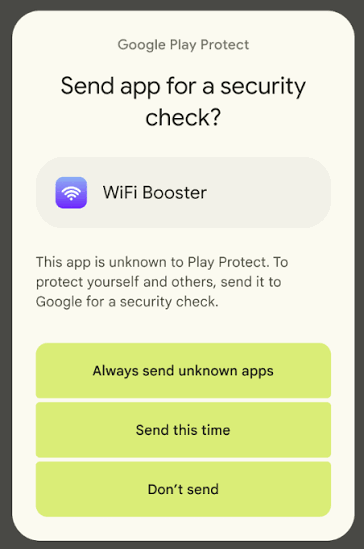
Android can also perform automatic checks in the background, so users do not necessarily have to manually scan every time they install an application.
What If Play Protect Warns You About an APK?
Don’t immediately assume the warning is a mistake.
First, check:
- Where did the APK come from?
- Who is the developer?
- Is it an original or modified version?
- Does the application actually need the permissions it requests?
- Is the APK being distributed through an unusual website?
- Can you find reliable information about the application elsewhere?
If you cannot establish where the APK came from or why Play Protect has flagged it, the safer approach is to avoid installing it.
A website telling you to simply turn off Play Protect should also be treated as a reason to investigate further.
Should You Turn Off Play Protect to Install an APK?
For normal APK installation, there is generally no good reason to disable your phone’s security protection simply because an installation is inconvenient.
If an APK is being blocked, first find out why.
It could be an incompatibility problem, a damaged download, or a genuine security warning.
Disabling Play Protect removes an important security layer while you are installing and using applications.
If you are having trouble installing an APK, check our guide on How to Fix APK Installation Problems on Android instead of immediately disabling security features.
Does Play Protect Make Every APK Safe?
No.
This is one of the most important points to understand.
Play Protect is a security tool, not a certificate saying that every application it allows is completely safe.
Security systems can detect many known or suspicious threats, but no security system should be treated as a guarantee against every possible problem.
You should still consider:
- The APK’s source
- The developer
- The application’s permissions
- Whether the APK has been modified
- The file’s reputation
- Any warnings shown by Android
For a broader checklist, see our guide on How to Check Whether an APK Is Safe Before Installing.
Play Protect and Apps From Unknown Sources
The term unknown sources can be confusing because it does not simply mean “malware.”
It generally refers to installing applications from sources other than the standard Google Play Protect distribution channel.
An APK downloaded from another website may therefore trigger additional security checks or warnings.
Android has also changed how this permission works over time. On newer Android versions, users normally grant Install unknown apps permission to a particular source, such as a browser or file manager.
If you want to understand this permission in more detail, read What Does “Unknown Sources” Mean on Android?
Play Protect vs Checking an APK Yourself
These two approaches work best together.
Play Protect provides automated security checks from Android.
Your own checks help you evaluate where the APK came from and whether it appears legitimate.
For example, you might check the developer and source before downloading the file, scan it with a reputable security service where appropriate, and then pay attention to any Play Protect warning during installation.
Neither approach should be treated as an absolute guarantee.
What If Play Protect Blocks an App You Trust?
Sometimes users may believe an application is legitimate even after receiving a warning.
Before doing anything else, verify that you have the correct application and that the APK came from a trustworthy source.
Check the developer information and compare the application with information from an official source.
If the warning remains and you cannot determine why the application was flagged, avoid forcing the installation simply because you want to use the app.
Frequently Asked Questions
Is Google Play Protect free?
Yes. Play Protect is a built-in Google security feature available on supported Android devices.
Does Play Protect check APKs?
Yes. Play Protect can check applications installed from outside Google Play as well as applications distributed through Google Play.
Should I disable Play Protect for APKs?
It is generally better to keep Play Protect enabled. If an APK is blocked, investigate the reason instead of immediately disabling the security feature.
Does Play Protect guarantee an APK is safe?
No. It provides an important layer of protection, but a lack of a warning should not be treated as proof that an APK is completely safe.
Where can I find Play Protect?
On many Android phones, open Google Play Store → Profile picture → Play Protect. Menu names may vary slightly depending on your device and Android version.
Final Thoughts
Google Play Protect is an important security layer for Android users, especially when installing applications from outside Google Play.
It can check apps, identify potentially harmful software, and warn or take action when it detects a problem. Still, Play Protect should not replace common sense when downloading APK files.
Always consider where an APK came from, who developed it, what permissions it requests, and whether Android displays a warning.
If Play Protect raises an alert, take a moment to investigate instead of automatically trying to bypass it. A few extra checks are usually better than installing an application you don’t fully trust.